
Connected Software shut down on Sep 30, 2022. See the announcement.
Activate Your Software
Instructions
This page describes how to activate Epicenter Server with a 2500 user license. This is a demo license, but the software is fully functional and you can ignore the demo warnings.
Epicenter Server
- Here is the Name and Key information:
- Install Epicenter Server on your computer, if you haven't already done so.
- From the Help menu in Epicenter Server, select Change License Code.
- An "Enter Key" window should open, that looks like
this:
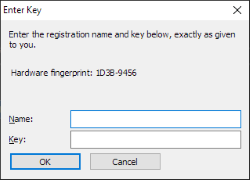
- Fill out the Name and the Key using the information from Step #1, above.
- Click the OK button.
- You should receive a message that they key has been successfully stored. Your software is now activated and ready to use.
- Restart the software using the icon on your desktop. Click Submit. You may get an error message about a crash - that's okay, ignore it.
Epicenter User
112H0X-ZZPUFN-QQMJFP-QC7EJC-Q2QNQT-1TQ4DV-JVX01W-90ZP0W-EAJ4F5-RYCN3T-3YNF8J